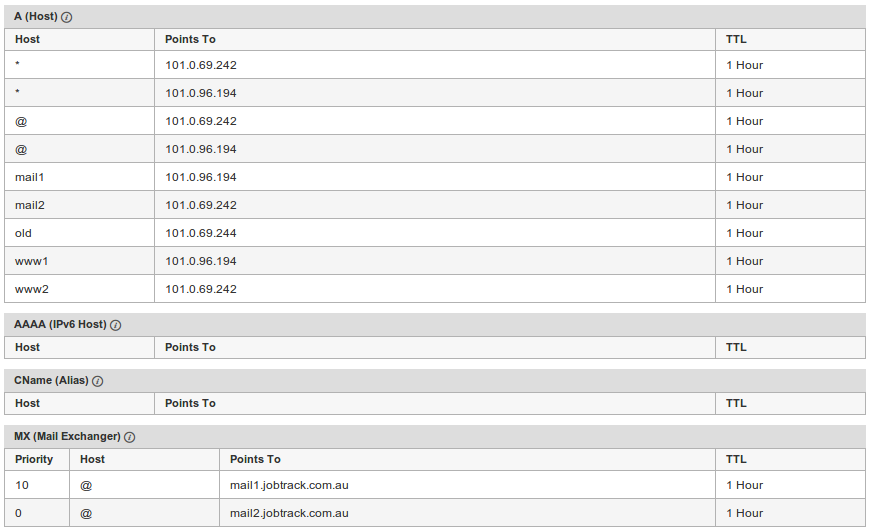
How to configure DNS round robin for web server failover?
Round-robin DNS gives cheap and easy load balancing and fault tolerance.


Server Cluster
A cluster of servers (two or more ) can be setup and the DNS entry for your site can be defined with the IP addresses for each of the servers, this is known as Round-robin DNS
DNS round-robin for Web server failover
- www1 -> 10.0.0.1
- www2 -> 10.0.0.2
- www -> 10.0.0.1, 10.0.0.2
Now the DNS server returns both IP addresses for each www query, in random order. If both web servers are up, obviously no problem. If one is down. the questions are, will the browser try the second IP address. and how long does it wait to do so?
Ideally the static IP of one server would be from one network provider and the other server IP would be from another network provider. This means we are not reliant on one network provider.
Successes with modern browsers
The client browser will choose one of the identical servers. If it can't connect to one then it will try the other.
Using recent versions of IE (8 and above), Opera, Safari, Firefox and Chrome. The browser will try one web server and if it can not connect the browser will try the next server, the process is user-transparent, and occurs only if the first server tried times out, and only for the first page requested from our site in any browser session.
The DNS round robin works best if the server is actually off not just slow/timing out as the modern browser can move to the next very quickly.
Failures with obsolete browsers
Browsers older than IE8 are not supported by the ST web application, but may still be used to view the web sites. Old browsers such as IE7 will only use the first IP address.
What are the advantages ?
-
- Rolling restart of the servers can be done transparently ( restart 1 server a few minutes later the next server).
- If one server crashes the users will transparently move to the next.
- The browser connection is "sticky" which is very important i.e. once the browser connects it will stay connected to the server it originally connected to.
Is there a downside?
During periods when one server was down, users of non-switching browsers ( IE7 ) would have a 50% chance of getting the bad server in an individual browser session. The usage of IE7 is now down to below 1% of web traffic for these browsers there is no advantage but a pretty big win for all modern browsers.
Note: Users with IE7 are prevented from logging into any ST servers due to the lack of HTML5 support but can be used browse the web sites.
Example
When we do a lookup on google the DNS returns 4 IP addresses:-
host www.google.com
www.google.com has address 74.125.237.210
www.google.com has address 74.125.237.212
www.google.com has address 74.125.237.208
www.google.com has address 74.125.237.211
www.google.com has address 74.125.237.209
www.google.com has IPv6 address 2404:6800:4006:806::1010
Repeating the lookup returns a different set of IP addresses:-
host www.google.com
www.google.com has address 74.125.237.177
www.google.com has address 74.125.237.178
www.google.com has address 74.125.237.176
www.google.com has address 74.125.237.180
www.google.com has address 74.125.237.179
www.google.com has IPv6 address 2404:6800:4006:806::1011
Sample setup used for JobTrack.com.au